Welcome to the StreetEasy and FUB Integration Pilot
Welcome to the StreetEasy + Follow Up Boss pilot! Connect your Experts leads to the FUB account you already use, with StreetEasy insights and synced updates to support your follow-up.
This guide covers how to link your accounts, what changes - and what stays the same - and where to get help along the way.

🔄 What's Changing
- Accepted connections flow into FUB. Accept an Experts connection in StreetEasy Agent Tools to create or update the FUB contact with contact and inquiry details.
- Buyer insights inform follow-up. View StreetEasy listing views, saves, and searches directly in FUB.
- Mapped stages update StreetEasy statuses. Changes to mapped FUB stages update the corresponding connection status based on your account’s mapping.
- Team reassignments stay in sync. When a team lead reassigns an Experts connection in either system, the owner updates in both.
☑️ What's Staying
- Keep your existing FUB account and subscription. No new account needed.
- Keep your current setup. During our onboarding process, we will map your existing lead stages without changing routing, email parsers, Smart Lists, or automations.
- Accept or decline connections in StreetEasy Agent Tools. Pending Experts connections don’t flow into FUB.
- Report transactions in StreetEasy Agent Tools. Report fully executed contracts and closings within 24 hours.
Linking your StreetEasy and FUB Accounts
Each participating agent, including team members, must link their own StreetEasy and FUB accounts.
When the StreetEasy team lets you know linking is available:
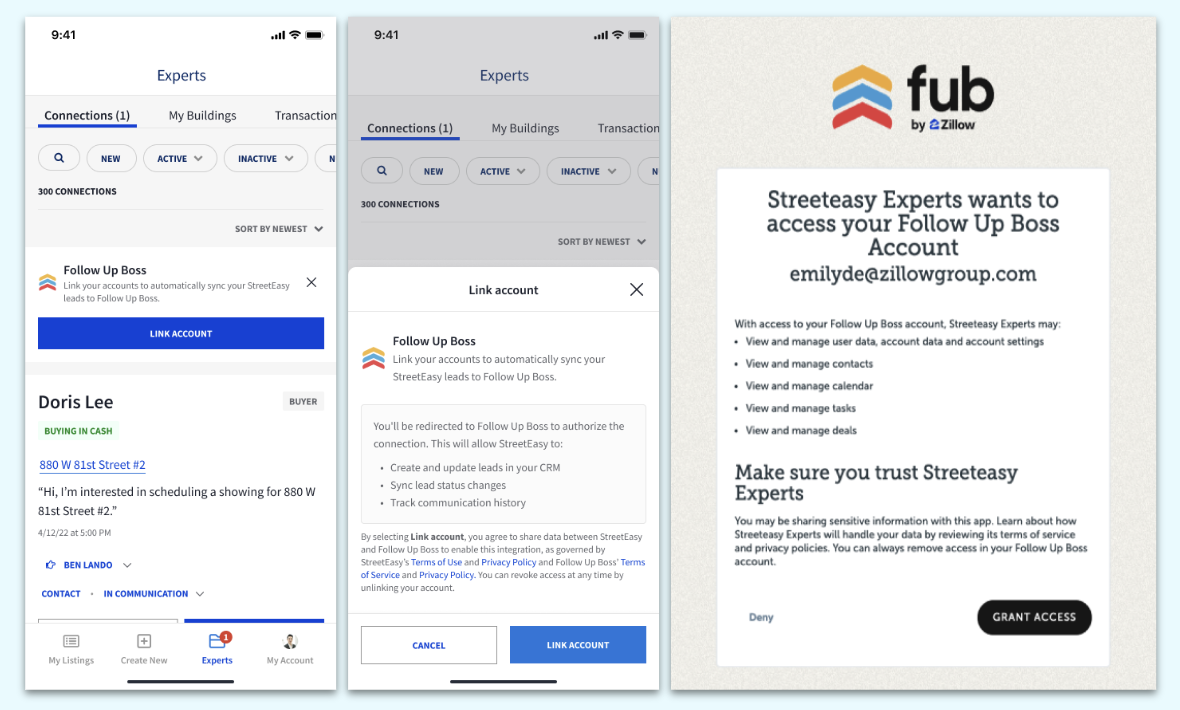
- Go to Connections and select Follow Up Boss → Link Account.
- Select Link Account to confirm.
- Sign in to the Follow Up Boss account you use for your business.
- Review the permissions and select Grant Access.
- Look for the Accounts Linked confirmation.
For Team Leads and independent agents only: After linking your account, email streeteasy-fub@streeteasy.com so our team can confirm your lead stages are mapped correctly.
StreetEasy connections and integration support
For help linking your accounts, missing Experts connections, stage/status syncing, or reassignment between StreetEasy and FUB, email: StreetEasy-FUB@streeteasy.com
To help us investigate, include:
- A brief description of what happened and what you expected.
- The email address associated with your FUB account.
- Screenshots or a screen recording, if helpful.
Follow Up Boss platform support
For general questions about using FUB (separate from the StreetEasy integration), reach out to FUB Support: support@followupboss.com or (855) 622-5311
Do I need a new FUB account or subscription?
Nope! You’ll simply connect StreetEasy to the FUB account you already use, and your current subscription stays exactly as it is. No second account, and no CRM migration.
Do I need to change my existing FUB stages or workflows?
There’s no need to rebuild anything. When you get started, just tell us which FUB stages you use for Experts connections, and the StreetEasy team will map them to the matching StreetEasy connection statuses. The pilot won’t change your routing, email parsers, Smart Lists, or automations.
Does everyone on the Experts team need to link their accounts?
Yes, each participating agent will link their own StreetEasy and FUB accounts. Linking the team lead’s account doesn’t automatically connect the rest of the team, so be sure everyone gets set up.
Can I accept new Experts connections in FUB?
Keep accepting or declining new Experts connections in StreetEasy Agent Tools, just like you do today. Once your integration is live, accepted connections will flow into FUB automatically. Pending connections won’t appear in FUB until you accept them.
Do I need to update connection statuses in both systems?
No - when you update a mapped stage in FUB, the matching connection status in StreetEasy updates automatically.
Additional questions? Reach out to StreetEasy-FUB@streeteasy.com