
StreetEasy is often the first site a buyer turns to when they’re looking for a new home in New York City. As such, when you’re an agent using StreetEasy, painting a complete picture is important. A big piece of that picture is making sure your profile shows all the deals you’ve closed — and that’s where claiming your deals on StreetEasy comes in. Here’s how to do it, and why it’s important.
Learn more in StreetEasy’s Listing Quality Policy.
Why is claiming your deals so important?
Showing your full record as an agent gives consumers confidence. If you’ve done the work and closed an apartment, then you should wear that sale as a badge of honor. But there is a real, tangible benefit, too. If a buyer or seller sees your name on a listing, and sees that you’ve closed several deals in that building or neighborhood, it will give that person all the more reason to trust you as their agent. It could also potentially qualify you for the StreetEasy Experts program.
We reached out to a successful agent on StreetEasy to hear her take on claimed deals. “Only if I claim my deal will I get credit on StreetEasy building pages,” says Dolly Hertz of Engel & Völkers New York City. ”I do a lot of deals along Central Park South, and a seller in a nearby building recently found me by searching Central Park South on StreetEasy.” If Hertz hadn’t claimed her deals on that specific street, that new client wouldn’t have encountered her, let alone had the confidence to enlist her as their agent.
How to claim a deal on StreetEasy
1. Log into your StreetEasy agent account
If you log into your account and don’t see an Agent Tools menu at the top of the page, it means your account isn’t fully set up as an agent. Please contact the StreetEasy support team and we’ll get you up and running.
2. Go to the building page of the listing in question
Most listings on StreetEasy are associated with a unit number that ladders up to a building page (like this one, for example). Find the building page for your listing by typing the building address into the search tool on the top right corner of the StreetEasy website, or by running a building search here.
3. Locate the unit
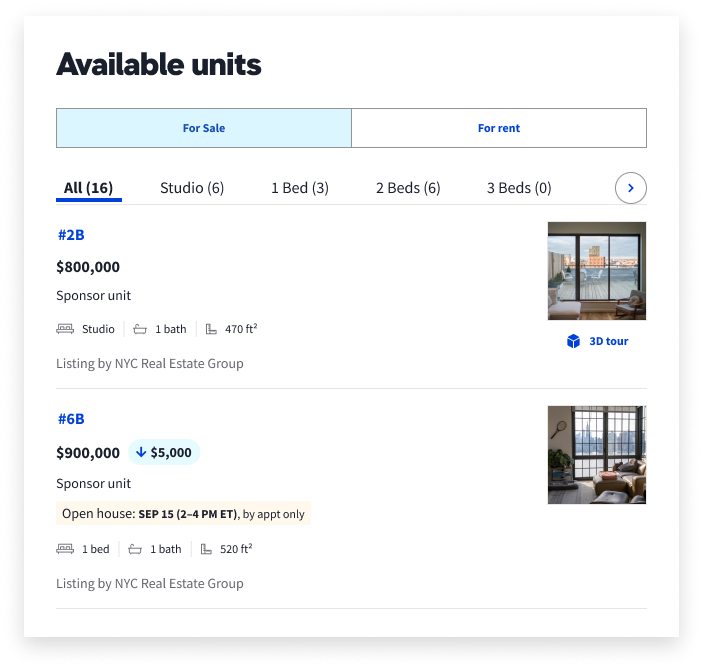
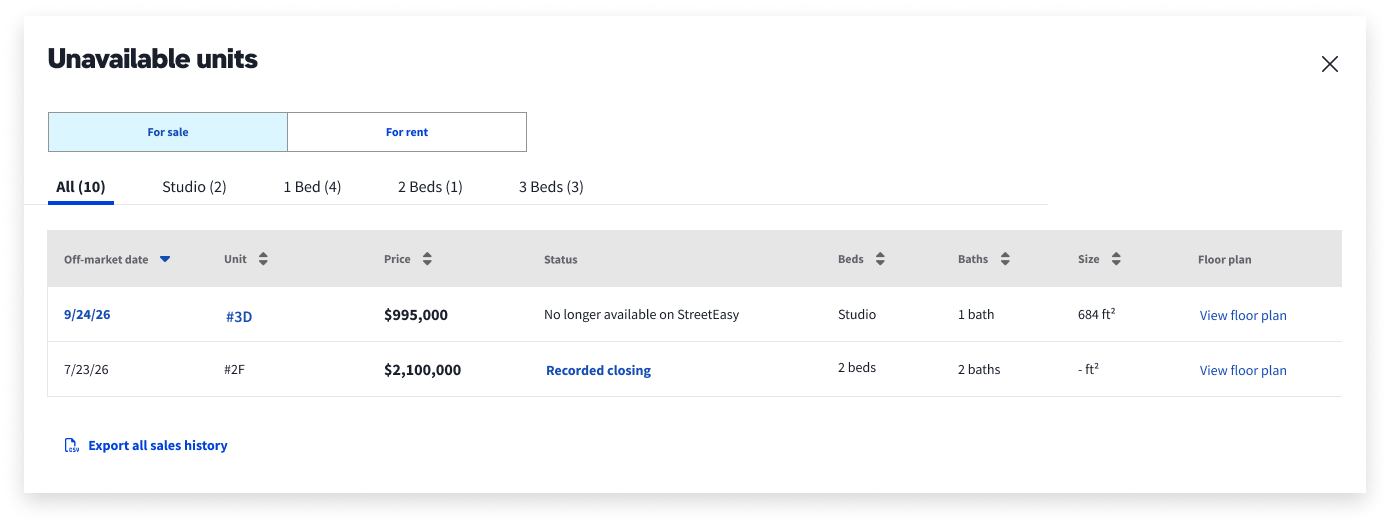
To claim your deal, you’ll need to locate the unit that has the closing history. If the unit is currently being advertised, you’ll find it in the Available units section of the building page. If the unit was previously advertised, go to View unavailable units and find the unit there. (If the unit is sold but not showing, contact the StreetEasy support team.)
4. Navigate to the closing page
If the NYC Department of Finance has a record of the sale, but no listing had been created on StreetEasy prior to sale, you should see a direct link to the closing page under Unavailable units. Click Recorded closing next to the correct unit to access the closing page.

Otherwise, if the unit is hyperlinked, click the unit number to access the listing page. On the listing page, go to Property history > Recent sales and find the accurate closing date for the deal you’re looking to claim. Click View closing record to access the closing page.
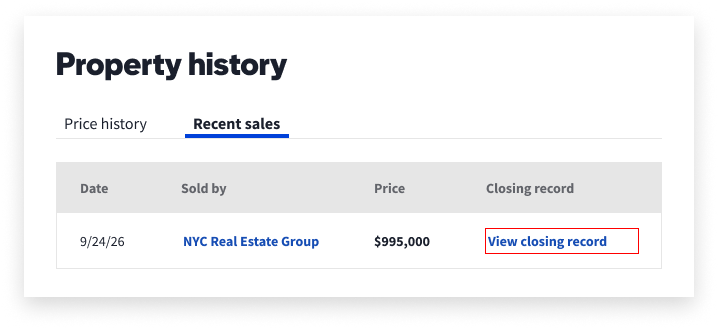
If you don’t see this link, it means we haven’t yet received the closing record from ACRIS (NYC Department of Finance). It can take anywhere from 4 to 12 weeks for the sale to be recorded in their system.
5. Claim the deal on the closing page
Once you’ve reached the closing page, you’ll see the option to claim the deal. Please note that the listing agent will be notified once you claim the sale.

In the box that appears, use the dropdown to select your name and brokerage, and certify that you were the buyer’s agent or seller’s agent. Claim the deal when you’re finished. Note that each closing, by default, accommodates one seller’s agent and one buyer’s agent. If your role in the transaction has already been claimed and you’d like to be added, please reach out to the StreetEasy support team.
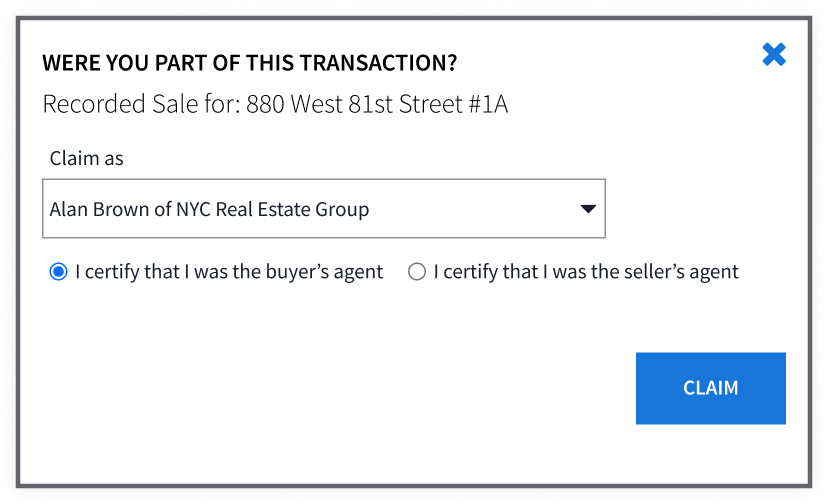
You’re all set. The deal will now show up on your StreetEasy profile.
FAQ: Claiming your deals on StreetEasy
Why can’t I claim a recent sale?
We need to get the recorded sale from the NYC Department of Finance in order to update the final closing price. As you may already know, there is typically a lag between when a sale closes and when it gets recorded with the city. Usually, it’s a 2 to 8 week timeframe, but it really depends on the seller’s attorney.
Once we get the recorded sale from the Department of Finance, we’ll link the sale to the listing, and the listing will be automatically updated with the final sale price and closing date.
Why can’t I claim an older sale?
It’s possible the information filed with the Department of Finance doesn’t match the record we have on StreetEasy. This can lead to a closing not being created. If this is the case, our support team is ready to help. Reach out to them by submitting a closing request. They may request the following information on your behalf in order to locate the closing record:
- Buyer or seller’s name
- Deed, RETT, or RPTT document ID number
- Full listing address filed with the Department of Finance, including:
- Unit number (some co-ops will use a resident unit rather than the address)
- Parking spots or other add-ons that would cause the filing to be “+”
Can I claim a rental deal?
No, you cannot claim a rental deal. The city does not keep a centralized database of recorded rental agreements as it does with sales, so there is no way for us to have a “closing page” for rentals.
Again, if you need additional assistance, reach out to us at support@streeteasy.com.