Onboarding for Team Members

Set Up Your New FUB Account

Create an account using the link sent to your email by your Team Lead. 
 
Note: If you do not sign up with the link sent by your Team Lead, your account will not be linked to your team. 
 
Log in to your account on FUB. When you first log in, check your email for a verification link from FUB and click it to access your account.


Need Help

Send an email to StreetEasy-FUB@streeteasy.com including your name and the email address associated with your FUB account as soon as you log in.
💡 To get you set up faster, StreetEasy will pre-set your Follow Up Boss account with our recommended settings — including lead stages, smart lists, automations, and dynamic tags — so you can hit the ground running.
1. In My Settings, connect your email so FUB can sync your client emails
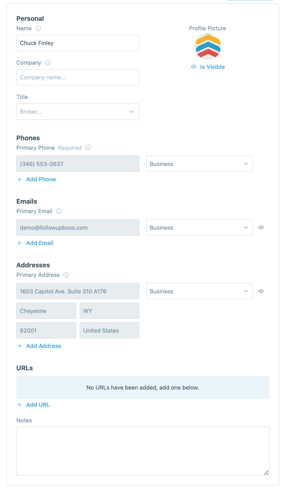
2. Then view and edit your vCard to easily send your contact information via text

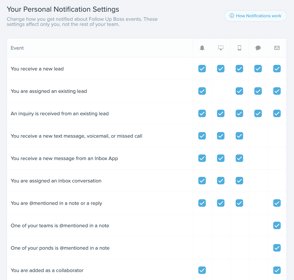
3. Manage your notification settings

💡 You'll also want to update your notification settings in your phone's system setting.


Need Help

Bring your existing contacts into FUB, then set up Lead Flow so every new lead is actioned as soon as it comes in.
 
Note: This may already be set up by your Team Lead. 
 
Set up Lead Flow for new incoming leads
  • Connect your lead sources — confirm FUB accepts leads from your source, then follow the setup instructions to connect it
  • Attach an automation — set the Automation 2.0 that fires automatically for each new lead from that source so follow-up starts the moment a lead arrives


Need Help

Each agent on a FUB account gets their own dedicated FUB phone number - a dedicated business line assigned to each agent, used for both calling and texting within FUB.

 
How it works:
  • Incoming calls to your FUB number route to you based on your settings
  • You initiate outbound calls from the FUB desktop or mobile app. The lead sees your FUB number as the caller ID, keeping your personal cell private
Set it up: 
  • Find your dedicated FUB number in your Settings— this is your professional business line for all calls and texts through FUB 
  • Configure how incoming calls reach you — forward to your mobile, ring both lines, or send straight to FUB voicemail
  • Set your Outbound Number and Calling Method — choose which FUB number (personal or inbox) is used for outgoing calls and select the calling method that works best for your workflow
  • Record a custom voicemail greeting — leads hear your name and business, not a generic robot message
  • Enable Caller ID on your mobile app — so incoming FUB calls are clearly labeled on your phone.
  • Place a test call — confirm calls ring, route, and record correctly before your first real lead comes in

Need Help

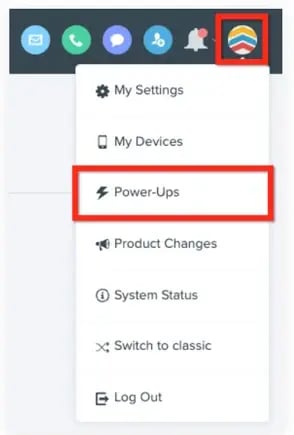
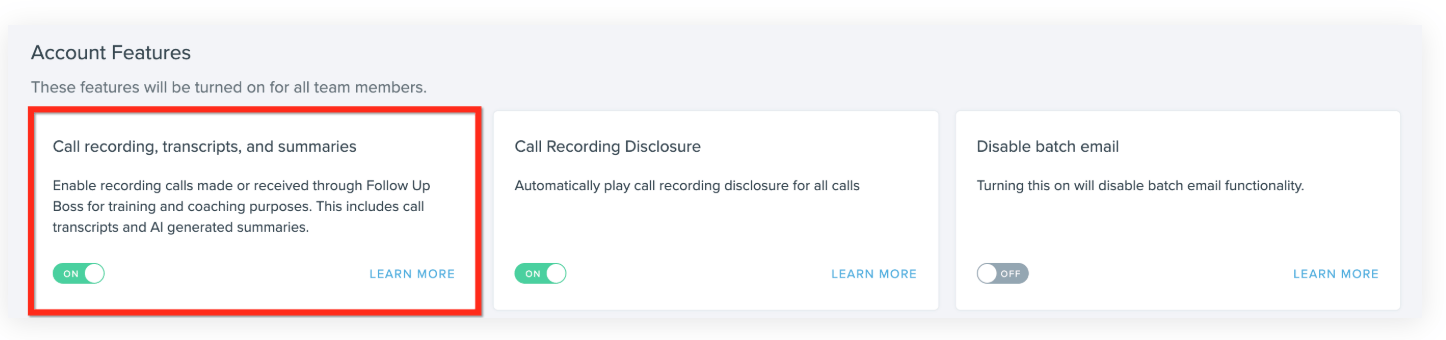
Call Recording and AI Smart Summaries (AKA your Power-Ups) turn every conversation into an automatic action plan, so nothing important gets lost.

 
  • Enable the Call Recording + AI Summaries & Transcripts Power-Up — applies to all FUB calls automatically once active
  • Introduce your team to recordings and AI summaries — show them where recordings live and how to act on AI-suggested tasks after a call
  • Add call summary review to your coaching routine — review agent summaries regularly to spot follow-up gaps and coaching opportunities
 

Need Help

Congrats! You've finished Step 1 🏆
Let the StreetEasy Team know once you've finished setting up FUB. You're ready to link with StreetEasy (Onboarding Step 2)! 
 
Reach out to StreetEasy-FUB@StreetEasy.com

Action Required

Let the StreetEasy Team know once you've finished setting up FUB. You're ready to link with StreetEasy (Onboarding Step 2)! 

Reach out to StreetEasy-FUB@StreetEasy.com

Questions? Reach out to us at StreetEasy-FUB@StreetEasy.com