
You can keep track of every connection’s progress in their journey by assigning them a connection status. Updating your connection statuses provides StreetEasy with valuable information on your performance, and is required for continued participation in the program. Provide at least weekly updates to your connection statuses, and if they transact, report all signed contracts and closings within 24 hours.
Here are the definitions of all possible connection statuses, and our tips for working some crucial ones. But first, let’s review what happens when you receive a new connection.
Receiving a new connection
Upon receiving a new connection, you’ll see the option to RESPOND NOW or PASS ON CONNECTION. Should you choose RESPOND NOW, during working hours (9:00am – 6:30pm ET) all Experts must respond within 30 minutes of receiving the connection, indicated by the date and time shown. Once you’ve messaged the connection, their status will be automatically updated to Attempted Contact and you’ll be able to view their contact information.
You can also choose to PASS ON CONNECTION, which routes the connection to another Expert with the appropriate experience to assist. If you’re a Team Lead, you’ll still see the option to Reassign the connection to another team member.
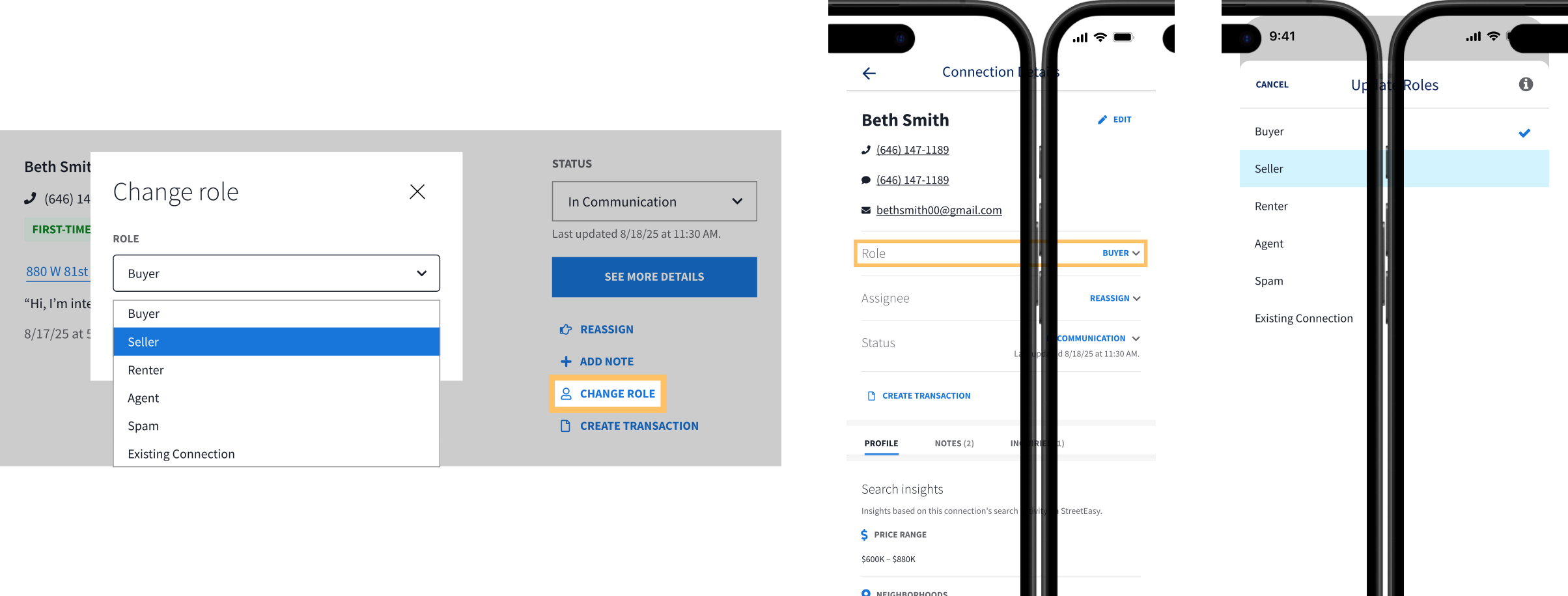
New connections are assigned a role of Buyer. If needed, you can change the connection’s role to Seller, Renter, Agent, Spam, or Existing Connection by selecting Change Role on desktop, or on the Agent Tools mobile app by opening the Connection Details.
Connection status definitions
The possible connection statuses are defined as follows:
Buyer
- New Connection: New connection in need of your response, not yet in communication
- Attempted Contact: Responded to the connection
- In Communication: Actively communicating with connection
- Appointment Set: Confirmed a day and time for a showing
- Showing Homes: Met with connection to tour properties
- Submitting Offers: Preparing or submitting at least one offer
- Contract Out: Contract is out and under review
- In Contract: Offer accepted and contract has been counter-signed
- Sale Closed: Closing complete
- Nurture: Connection not ready to transact soon
- Rejected by Client: Connection not interested in working together
- Unresponsive: Connection hasn’t replied in seven or more days
Seller
- New Connection: New connection in need of your response, not yet in communication
- Attempted Contact: Responded to the connection
- In Communication: Actively communicating with connection
- Appointment Set: Confirmed a day and time for an appointment
- Exclusive Agreement: Connection has signed an exclusive agreement
- Listing Advertised: Exclusive listing is advertised on StreetEasy
- Contract Out: Contract is out and under review
- In Contract: Offer accepted and contract has been counter-signed
- Sale Closed: Closing complete
- Nurture: Connection not ready to transact soon
- Rejected by Client: Connection not interested in working together
- Unresponsive: Connection hasn’t replied in seven or more days
How to work them
New Connection
Respond or pass on the connection within 30 minutes, but ideally within 5 minutes. Tell the connection you’ll give them a call, which we recommend for early stages in the process.
In Communication
Use ALM to book an appointment, find properties the buyer may want to see, and learn why they’re looking for a new home. Follow up strategically using the 3-7-10-2 plan.
Appointment Set
Text to confirm the appointment two days prior. Continue looking for other properties to show the buyer.
Showing Homes
Keep these connections warm by updating them on the homes they saw and liked, offering to show them more properties, and discussing the next steps toward submitting offers.
Submitting Offers
Walk them through the process of submitting offers and set realistic expectations. Ensure the buyer feels comfortable and confident in the offer using your local knowledge on the market, nuances of the building or neighborhood, and past deals involving similar homes.
Nurture
Send personalized outreach relevant to the buyer’s search. Pair this with passive follow-up — drip campaigns, newsletters, market reports, etc.
Unresponsive
Refresh your messaging and try different contact methods. If you’re on a team within the program, talk to your Team Lead about reassigning the connection to another team member.