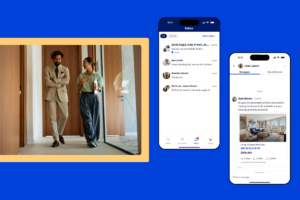
New York City agents and buyers turn to StreetEasy as a trusted platform for connecting with one another and completing the journey of buying a home. Now, StreetEasy Experts can enjoy communication and collaboration with buyers directly on our platform using StreetEasy Inbox℠. Inbox puts your StreetEasy client conversations all in one place — no more juggling texts, emails, or spreadsheets, or concerns about other agents appearing when you use StreetEasy Inbox℠ to share listings directly with clients.

Read on to start effortlessly communicating and collaborating right here on StreetEasy.

Video Thumbnail
Table of Contents

    Why use StreetEasy Inbox℠?

    StreetEasy Inbox℠ puts your expertise front and center, helping you stay one step ahead of your clients by easily sharing listing recommendations and coordinating the details of their home search. The unified, organized experience allows you to streamline your conversations and easily find everything you need to reference in one place. What’s more, when you share a listing directly from StreetEasy Inbox℠, you’ll be the only agent shown on the listing.

    Accessing StreetEasy Inbox℠

    Access your inbox by logging into StreetEasy with your brokerage email, either using the website on desktop or the StreetEasy app (not Agent Tools) for iOS or Android. We recommend using the app for the best experience. 

    Make sure you have the latest version of the StreetEasy app to access StreetEasy Inbox℠. In the app, visit the Profile tab and ensure you’ve turned on push notifications, as well as on your device, to be notified whenever you receive a new message.

    You can navigate to StreetEasy Inbox℠ from the bottom menu in the StreetEasy app or the top right menu on desktop. Once you’ve accepted a connection and sent them a message, visit StreetEasy Inbox℠ where the conversation will appear as a chat.

    Screen images simulated

    Additionally, when you visit your Connections page, you’ll see an OPEN CHAT button next to connections you’ve started conversations with. Use this button to be taken directly to the chat in StreetEasy Inbox℠ (doing so on Agent Tools will open up the chat in the StreetEasy app).

    How to use StreetEasy Inbox℠

    You’ll see your chats in a single panel.

    Screen images simulated

    Select any chat to open it. In the app, you’ll see two panels (Messages and Shared homes) as tabs when you open a chat. On desktop, you’ll see a middle panel showing the selected chat, where you’ll send and receive messages with the connection or group. For both, a panel to the right contains listings shared within that conversation. 

    Screen images simulated

    Filter or archive chats

    Use the dropdown above your list of chats to filter them by Active or Inactive. Inactive chats are those that have been archived, blocked, or reassigned to another team member; all others are Active.

    You can also archive chats, or if needed, report or block the sender. In the app, swipe left on the chat to see these options; on desktop, use the menu at the top right of the chat.

    Screen images simulated

    Share homes to your StreetEasy Inbox℠ chats

    You can share homes to your StreetEasy Inbox℠ chats directly from a listing. On the app or desktop, from the listing page, use the SHARE button to bring up a list of your chats. Choose the appropriate one, write your message, then click SHARE to send the listing to the selected chat. If you need to send the listing to a connection who’s not in an existing chat, click VIEW ALL to see a list of all of your connections.

    When you share a listing with a connection directly through StreetEasy Inbox and they visit the link, you’ll be the only agent who appears on the listing.

    Screen images simulated

    How to use StreetEasy Inbox℠ with Teams

    Team Leads within the Experts program can create group chats or add team members to an existing chat.

    To start a group chat when accepting a new connection: Upon receiving a new connection, choose to RESPOND NOW to the connection. Write your response, then use the SELECT TEAM MEMBER dropdown to choose a team member to include in the chat. Note that the selected team member then becomes the assignee for the connection. Send your response to create a group chat between you, the connection, and the team member.

    Screen images simulated

    To reassign a connection to a team member: Choose REASSIGN CONNECTION, then choose a team member to reassign the chat to. Your existing chat with the connection will be archived, and the team member will need to start a new chat with the connection.

    Screen images simulated

    Start using StreetEasy Inbox℠ today for seamless communications that strengthen your relationships and help you close deals with confidence. For the best experience, ensure you have the latest version of the StreetEasy app for iOS or Android, and turn on push notifications in your device settings and the app.

    StreetEasy is an assumed name of Zillow, Inc. which has a real estate brokerage license in all 50 states and D.C. See real estate licenses. StreetEasy Concierge team members are real estate licensees, however they are not your agents or providing real estate brokerage services on your behalf. StreetEasy does not intend to interfere with any agency agreement you may have with a real estate professional or solicit your business if you are already under contract to purchase or sell property.